TallyPrime

+91 8448449099

Have a valid TSS subscription? Eligible customers can upgrade to the latest supported TallyPrime release without buying a new licence.

New TallyPrime 7.2 - Release Note Know More Download Now 

TallyPrime is accounting and business management software developed by Tally Solutions. It helps Indian businesses manage bookkeeping, sales and purchase invoices, inventory, banking, GST-related work and financial reports from one application.

Whether you run a small business, manage accounts or review company performance, TallyPrime helps you record transactions, track receivables and payables, monitor stock and access reports needed for everyday decisions.

Businesses can also explore connected GST services, supported banking integrations and AI-assisted document processing through TallyIra. Availability depends on the TallyPrime release, licence, service eligibility and configuration.

TallyPrime is developed by Tally Solutions Pvt. Ltd. Antraweb Technologies is a Tally Partner helping businesses purchase, install, implement, customize and get support for TallyPrime.

Key benefits of TallyPrime:

  • Accounting and billing: Record sales, purchases, receipts and payments while keeping your accounts organised.
  • Inventory control: Track stock, sales orders, purchase orders and inventory movement.
  • GST and compliance: Handle applicable GST records, e-invoicing, e-way bills and supported compliance workflows.
  • Reports and insights: Review cash flow, receivables, payables, profitability and other business reports.

Already using Tally? Check your TSS eligibility before upgrading, and back up company data before moving from an older release.

Need assistance with purchasing, installation or upgrading? Antraweb can help you choose an edition and plan the next steps for your business.


What is TallyPrime?

TallyPrime brings accounting, invoicing, inventory management, statutory compliance and reporting into one business application. Its Go To navigation and detailed financial reports help users find information and follow day-to-day business operations.

Who can use TallyPrime?

TallyPrime is suitable for business owners, accountants, Chartered Accountants, finance teams, retailers, traders, manufacturers and distributors who need reliable records and timely business information.

Why choose TallyPrime for your business?

It helps teams manage everyday transactions and review stock, outstanding payments, cash flow and financial statements from the same system. The features you use can be configured to suit your business needs.

What about newer features?

Recent releases provide enhanced GST and connected-services workflows, more flexible reports and optional AI-assisted document processing through Docs by Ira. Check release notes and subscription requirements before using a specific capability.

Why work with Antraweb?

As a Tally Partner, Antraweb can assist with licence selection, implementation, data migration, customization and product support. You can compare TallyPrime pricing, review installation guidance or use the enquiry option above for assistance.

Antraweb TallyWalas - Tally sales and support experience
34 Years Of
Experience

35772

Tally Customers

300+

Tally Experts

31040

Customer Support Feedback

515560

Support Ticket Resolved

308

Customized Products

15000

People Trained by Enrich Program

TallyPrime 7.2 Updates and Key Features

What is new in TallyPrime Release 7.2?

Released on 12 October 2026, TallyPrime 7.2 brings improvements to purchase-order printing, GST annual return preparation and selected compliance workflows. Key changes include:

  • Purchase-order print templates: More flexible templates and supported print settings for purchase orders.
  • GSTR-9 preparation: Improved export support for annual GST computation and reconciliation.
  • Extended e-invoicing sessions: Eligible users can select sessions of up to 30 days for supported e-invoicing and e-way bill services.
  • Updated statutory support: Enhancements for applicable e-TDS and e-TCS return filing, along with easier access to TallyIra setup.

See the TallyPrime 7.2 release notes for detailed updates. Feature availability may depend on configuration and eligibility.

Core TallyPrime Features

The following screenshots highlight established navigation and reporting features used in everyday TallyPrime work.

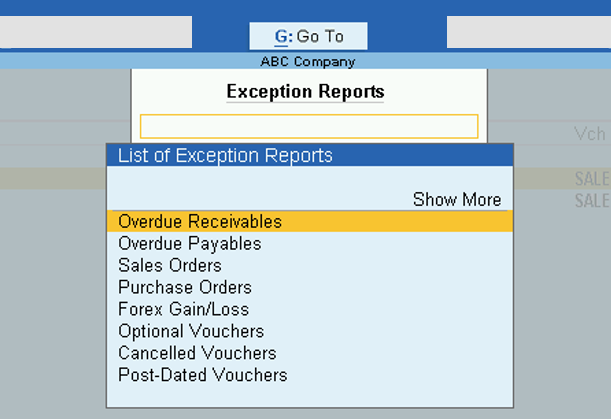
Go To Navigation

Use Go To to find reports and frequently used functions without navigating through multiple menus.

TallyPrime Go To navigation screen
exception reports

Detailed Reports

Explore accounting and business reports in detail to better understand transactions, balances and exceptions.

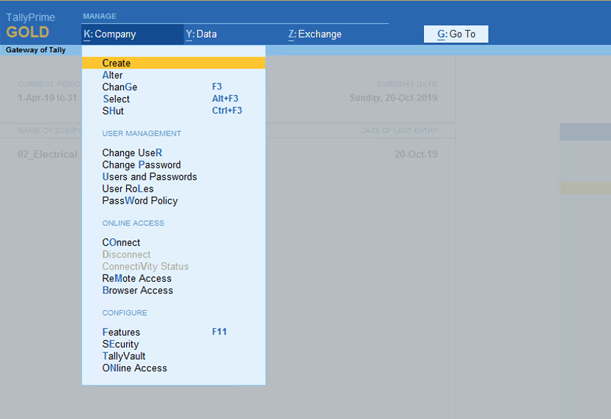
Easy-to-use Top Menu

Access common actions and navigation shortcuts from a clear, organised menu.

TallyPrime top navigation menu
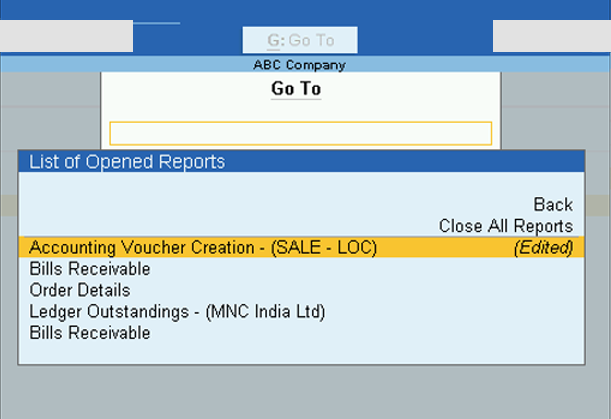
Multi Tasking

Easy Report Switching

Switch between open reports and return to a previous task without starting your navigation again.

Clear and Familiar Interface

Work in a simpler interface designed to make everyday accounting and reporting easier to navigate.

TallyPrime interface with updated menu design

Frequently Asked Questions About TallyPrime

What is TallyPrime?

TallyPrime is accounting and business management software developed by Tally Solutions. It helps businesses manage invoices, bookkeeping, inventory, GST-related work, banking and financial reports from one application.

Read more: What is TallyPrime

Why TallyPrime?

TallyPrime combines everyday accounting with inventory, compliance and reporting tools. Its Go To search and organised reports help business owners and accountants find information and manage routine transactions.

Read more: Why TallyPrime

What are the features of TallyPrime?

TallyPrime supports accounting, invoicing, inventory, payroll, GST-related workflows, banking and business reports. Supported releases also offer connected services and optional AI-assisted document processing through TallyIra.

Read more: TallyPrime features

Comparison between Tally ERP 9 and TallyPrime

TallyPrime builds on Tally.ERP 9 with easier navigation, Go To search, updated reporting and newer connected services. The right upgrade approach depends on your current release, licence and company data.

Read more: Tally ERP 9 vs TallyPrime

What are the requirements to get TallyPrime?

New customers can purchase a TallyPrime Silver or Gold licence. Existing eligible users may upgrade with an active TSS subscription; check software compatibility, licensing and system requirements before installing.

Read more: Requirements to get TallyPrime

Why should I upgrade my existing Tally software to TallyPrime?

An eligible upgrade can provide newer features, usability improvements and statutory updates. Back up your company data first, review compatibility and confirm your TSS entitlement before upgrading.

Read more: Upgrade to TallyPrime

How to install TallyPrime?

Download the installer from a trusted Tally or Antraweb download page, run the setup with suitable Windows permissions and follow the on-screen steps. Back up any existing company data before upgrading.

Read more: How to install TallyPrime

What is the price of TallyPrime?

TallyPrime Silver is listed at ₹22,500 and TallyPrime Gold at ₹67,500 for perpetual licences in India, excluding 18% GST. Prices and other plan options should be confirmed on the pricing page before purchase.

Read more: TallyPrime price details

How to migrate Tally ERP 9 data to TallyPrime?

First create and verify a backup of your Tally.ERP 9 company data. Install a compatible TallyPrime release, follow the guided migration process and verify ledgers, balances and reports after migration.

Read more: Migrate data to TallyPrime

What is E-invoicing and whom is it applicable to?

GST e-invoicing is the reporting of prescribed invoices to an Invoice Registration Portal to obtain an IRN and QR code. In India, the threshold was reduced to annual aggregate turnover exceeding ₹5 crore from 1 August 2023; exemptions and other rules apply.

Read more: What is e-invoicing

How to generate E-invoice in TallyPrime?

Set up GST and e-invoicing details in TallyPrime, record an eligible sales invoice and submit it to the Invoice Registration Portal using the supported workflow. Once approved, TallyPrime can record the IRN and QR code.

Read more: Generate e-invoice in TallyPrime

How to generate E-invoices in Bulk?

For eligible transactions, open the e-Invoice report or the Exchange menu in TallyPrime, select invoices pending IRN generation and send them together. Review validation errors and the returned status for each invoice.

Read more: Generate e-invoices in bulk

How to alter or cancel generated E-invoice?

An invoice with a generated IRN generally cannot be freely edited at the portal. If eligible, cancel its IRN within the permitted 24-hour window using the supported TallyPrime or IRP workflow; later corrections follow applicable GST rules.

Read more: Alter or cancel an e-invoice

How to track or check status of your E-invoices?

Use the e-Invoice report in TallyPrime to review invoices awaiting IRN generation, successful registrations, cancellations and errors. Where necessary, reconcile the status against the Invoice Registration Portal.

Read more: Track e-invoice status

What is the process to be followed for E-invoice generation for Tally users using older versions of Tally?

Check whether the older Tally release supports the current e-invoicing requirements. If not, consider upgrading to a supported TallyPrime release or follow an approved portal or integration process, with a data backup before migration.

Read more: E-invoice process for older Tally versions

What is the difference between TallyPrime Silver and Gold?

TallyPrime Silver is designed for one user working at a time, whereas Gold supports multiple users working simultaneously on a local network. Choose an edition based on team size and how many people need concurrent access.

Read more: TallyPrime pricing and editions

What is TSS and when do I need to renew it?

Tally Software Services (TSS) provides eligible product updates and connected services during an active subscription. If your subscription has expired or is approaching expiry, check your entitlement before renewing or upgrading.

Check TSS renewal options

Does TallyPrime support AI-assisted invoice processing?

TallyIra includes Docs by Ira, which can read supported business documents and prepare draft accounting entries for review. Setup, eligibility and usage terms apply, and entries should be reviewed before being accepted.

Learn more about TallyIra

Subscribe To Our Newsletter To Get Latest Updates & News

Choose Privacy. Choose Antraweb.

iso dmca